Tools
- class shapepy.tools.Is[source]
Bases:
objectContains functions to test the objects, telling if an object is a number, or it’s integer, etc
- analytic() bool
Tells if given object is an analytic function
- finite() bool
Check if a number is finite.
Parameters
- numberReal
The number to check for being finite
Returns
- bool
True if the number is finite, False otherwise
Examples
>>> Is.finite(float("inf"))
False
>>> Is.finite(0)
True
- infinity() bool
Check if a number is negative or positive infinity.
Parameters
- numberReal
The number to check for being infinity
Returns
- bool
True if the number is infinity, False otherwise
Examples
>>> Is.infinity(-float("inf"))
True
>>> Is.infinity(float("inf"))
True
>>> Is.infinity(0)
False
- instance(class_or_tuple, /)
Return whether an object is an instance of a class or of a subclass thereof.
A tuple, as in
isinstance(x, (A, B, ...)), may be given as the target to check against. This is equivalent toisinstance(x, A) or isinstance(x, B) or ...etc.
- integer() bool
Check if a number is integer.
Parameters
- numberReal
The number to check for being an integer
Returns
- bool
True if the number is integer, False otherwise
Examples
>>> Is.integer(1)
True
>>> Is.integer(1.2)
False
- jordan() bool
Checks if the parameter is a Jordan Curve
Parameters
obj : The object to be tested
Returns
- bool
True if the obj is a Jordan Curve, False otherwise
- piecewise() bool
Checks if the parameter is a Piecewise curve
Parameters
obj : The object to be tested
Returns
- bool
True if the obj is a PiecewiseCurve, False otherwise
- point() bool
Checks if the given point is a Point2D object or a tuple of two reals
Parameters
- pointPoint2D or tuple of two reals
The point to be checked
Returns
- bool
True if the point is a Point2D or a tuple of two reals, False otherwise
- rational() bool
Check if a number is integer or rational.
Parameters
- numberReal
The number to check for rationality
Returns
- bool
True if the number is rational, False otherwise
Examples
>>> Is.rational(1)
True
>>> Is.rational(Fraction(1, 2))
True
>>> Is.rational(0.5)
- class shapepy.tools.To[source]
Bases:
objectContains static methods to transform objects to some type numbers
- angle() Angle
Converts an object to an Angle instance
If it’s already an angle, gives the same instance
- If it’s a string, decides depending on the content:
“10deg” -> Angle.degrees(10)
“0.25tur” -> Angle.turns(0.25)
“2.1rad” -> Angle.radians(2.1)
If it’s any another type, converts to a number, and gives it in radians
Example
>>> angle("10deg")
>>> angle("0.25tur")
>>> angle("2.1rad")
>>> angle(1.25)
- bezier() Bezier
Creates a Bezier instance
- finite() Real
Converts the number to an finite number.
Parameters
- numberAny
Number to be converted to an integer
Returns
- Real
The converted number in integer
Raises
- ValueError
If the number is not finite
Examples
>>> To.finite(-1)
-1
>>> To.finite(0)
0
>>> To.finite(1)
1
>>> To.finite(1.5)
1.5
- class float(x=0, /)
Bases:
objectConvert a string or number to a floating point number, if possible.
- as_integer_ratio()
Return integer ratio.
Return a pair of integers, whose ratio is exactly equal to the original float and with a positive denominator.
Raise OverflowError on infinities and a ValueError on NaNs.
>>> (10.0).as_integer_ratio()
(10, 1)
>>> (0.0).as_integer_ratio()
(0, 1)
>>> (-.25).as_integer_ratio()
(-1, 4)
- conjugate()
Return self, the complex conjugate of any float.
- fromhex()
Create a floating-point number from a hexadecimal string.
>>> float.fromhex('0x1.ffffp10')
2047.984375
>>> float.fromhex('-0x1p-1074')
-5e-324
- hex()
Return a hexadecimal representation of a floating-point number.
>>> (-0.1).hex()
'-0x1.999999999999ap-4'
>>> 3.14159.hex()
'0x1.921f9f01b866ep+1'
- imag
the imaginary part of a complex number
- is_integer()
Return True if the float is an integer.
- real
the real part of a complex number
- integer() Integral
Converts the number to an integer.
Parameters
- numberReal
Number to be converted to an integer
Returns
- int
The converted number in integer
Examples
>>> To.integer(-1)
-1
>>> To.integer(0)
0
>>> To.integer(1)
1
- point() Point2D
Converts a point to a Point2D object
Parameters
- pointPoint2D or tuple of two reals
The point to be converted
Returns
- Point2D
The converted point
- polynomial() Polynomial
Creates a polynomial instance from given coefficients
- rational(denominator: Rational = 1) Rational
Divide two rational numbers and return the result as a fraction. If any input is not integer/rational, performs standard division.
Parameters
- numeratorint or rational or float
The numerator number
- denominatorint or rational or float
The divisor number
Returns
- Rational
A instance if inputs are integers/rational
Raises
- ZeroDivisionError
If denominator is zero
- TypeError
If inputs are not numeric types
Notes
This function preserves exact rational representation when inputs are integers or rational numbers. For example:
Examples
>>> To.rational(1, 2)
Fraction(1, 2)
>>> To.rational(12, 9)
Fraction(4, 3)
>>> To.rational(22, 7)
Fraction(22, 7)
Scalar
- class shapepy.scalar.reals.Math[source]
Bases:
objectContains static methods for mathematical functions
- NEGINF = -inf
- POSINF = inf
- static atan2(ycoord: Real, xcoord: Real) Real[source]
Compute the arc tangent of y/x choosing the quadrant correctly.
Parameters
- ycoordReal
The y-coordinate of the point
- xcoordReal
The x-coordinate of the point
Returns
- float
Array of angles in radians in the range [-pi, pi)
Examples
>>> arctan2(1, 1)  # 45 degrees = π/4 radians
0.7853981633974483
>>> arctan2(-1, 1)  # -45 degrees = -π/4 radians
-0.7853981633974483
>>> arctan2(1, -1)  # 135 degrees = 3π/4 radians
2.3561944901923448
- binom(k, /)
Number of ways to choose k items from n items without repetition and without order.
Evaluates to n! / (k! * (n - k)!) when k <= n and evaluates to zero when k > n.
Also called the binomial coefficient because it is equivalent to the coefficient of k-th term in polynomial expansion of the expression (1 + x)**n.
Raises TypeError if either of the arguments are not integers. Raises ValueError if either of the arguments are negative.
- cosh()
Return the hyperbolic cosine of x.
- static degrees(angle: Real) Real[source]
Convert an angle from radians to degrees.
This function performs the angular conversion using the mathematical relationship that pi radians equals 180 degrees. The conversion factor is calculated as 180/pi, ensuring precise transformation between the two angular measurement systems.
Parameters
- angleReal
The angle in radians to convert
Returns
- Real
The equivalent angle in degrees
Examples
>>> degrees(0)
0
>>> degrees(pi / 2)
90
>>> degrees(pi)
180
Notes
This function uses the math module’s degrees() function internally, which handles edge cases and provides optimal numerical precision for the conversion.
- Raises:
TypeError: If the input is not a numeric type
- factorial()
Find x!.
Raise a ValueError if x is negative or non-integral.
- static fmod(numer: Real, denom: Real) Real[source]
Returns the floating-point remainder of division x1/x2.
Parameters
- numerfloat
Dividend
- denomfloat
Divisor
Returns
- float
The remainder of x divided by y, with the same sign as x.
Examples
>>> fmod(5.0, 2.0)
1.0
>>> fmod(-5.0, 2.0)
-1.0
>>> fmod(5.0, -2.0)
1.0
- static hypot(xcoord: Real, ycoord: Real) Real[source]
Calculate Euclidean distance from origin point (0,0).
Parameters
- xcoordfloat
The x-coordinate of the point
- ycoordfloat
The y-coordinate of the point
Returns
- float
The Euclidean distance from the origin point (0,0)
Examples
>>> calculate_distance_from_origin(3, 4)
5.0
>>> calculate_distance_from_origin(0, 0)
0.0
- radcos()
Return the cosine of x (measured in radians).
- radsin()
Return the sine of x (measured in radians).
- sinh()
Return the hyperbolic sine of x.
- sqrt()
Return the square root of x.
- tau: Real = 6.283185307179586
- static turcos(angle: Real)[source]
Compute the cossinus of an angle in unitary form (turns).
This function is equivalent to math.cos(2*math.pi*angle)
Reference: * https://en.wikipedia.org/wiki/Turn_(angle)
Parameters
- angleReal
Angle in turns measure
Returns
- float
Cossinus of the unitary angle
Examples
>>> turcos(0)  # cossinus of 0 degrees
1
>>> turcos(0.25)  # cossinus of 90 degrees
0
>>> turcos(0.5)  # cossinus of 180 degrees
-1
>>> turcos(0.75)  # cossinus of 270 degrees
0
>>> turcos(1)  # cossinus of 360 degrees
1
- static tursin(angle: Real)[source]
Compute the sine of an angle in unitary form (turns).
This function is equivalent to math.sin(2*math.pi*angle)
Reference: * https://en.wikipedia.org/wiki/Turn_(angle)
Parameters
- angleReal
Angle in turns measure
Returns
- float
Sine of the unitary angle
Examples
>>> tursin(0)  # sine of 0 degrees
0
>>> tursin(0.25)  # sine of 90 degrees
1
>>> tursin(0.5)  # sine of 180 degrees
0
>>> tursin(0.75)  # sine of 270 degrees
-1
>>> tursin(1)  # sine of 360 degrees
0
- class shapepy.scalar.angle.Angle(quad: int = 0, part: Real = 0)[source]
Bases:
objectClass that stores an angle.
Handles the operations such as __add__, __sub__, etc
- classmethod arg(xcoord: Real, ycoord: Real)[source]
Compute the complex argument of the point (x, y)
Parameters
- xcoordReal
The x-coordinate of the point
- ycoordReal
The y-coordinate of the point
Returns
- Angle
The Angle instance such tangent gives y/x
Examples
>>> Angle.arg(1, 0)  # 0 degrees
0 deg
>>> Angle.arg(1, 1)  # 45 degrees
45 deg
>>> Angle.arg(0, 1)  # 90 degrees
90 deg
>>> Angle.arg(-1, 1)  # 135 degrees
135 deg
- classmethod atan2(ycoord: Real, xcoord: Real)[source]
Compute the complex argument of the point (x, y)
Parameters
- ycoordReal
The y-coordinate of the point
- xcoordReal
The x-coordinate of the point
Returns
- Angle
The Angle instance such tangent gives y/x
Examples
>>> Angle.atan2(0, 1)  # 0 degrees
0 deg
>>> Angle.atan2(1, 1)  # 45 degrees
45 deg
>>> Angle.atan2(1, -1)  # 135 degrees
135 deg
>>> Angle.atan2(-1, 1)  # -45 degrees
315 deg
- cos() Real[source]
Computes the cossinus value for the angle
Return
- Real
The cossinus result of the angle
Example
>>> Angle.degrees(0).cos()
1
>>> Angle.degrees(45).cos()
0.7071067811865476
>>> Angle.degrees(90).cos()
0
- classmethod degrees(value: Real) Angle[source]
Gives an Angle instance for given value measured in degrees
Parameters
- valueReal
The angle measured in degrees
Return
- Angle
The Angle instance
Example
>>> Angle.degrees(0)
0 deg
>>> Angle.degrees(90)
90 deg
>>> Angle.degrees(180)
180 deg
>>> Angle.degrees(270)
270 deg
>>> Angle.degrees(360)
0 deg
>>> Angle.degrees(720)
0 deg
- classmethod radians(value: Real) Angle[source]
Gives an Angle instance for given value measured in radians
Parameters
- valueReal
The angle measured in radians
Return
- Angle
The Angle instance
Example
>>> Angle.radians(0)
0 deg
>>> Angle.radians(math.pi/2)
90 deg
>>> Angle.radians(math.pi)
180 deg
>>> Angle.radians(3*math.pi/2)
270 deg
>>> Angle.radians(2*math.pi)
0 deg
- sin() Real[source]
Computes the sinus value for the angle
Return
- Real
The sinus result of the angle
Example
>>> Angle.degrees(0).sin()
0
>>> Angle.degrees(45).sin()
0.7071067811865476
>>> Angle.degrees(90).sin()
1
- classmethod turns(value: Real) Angle[source]
Gives an Angle instance for given value measured in turns
Parameters
- valueReal
The angle measured in turns
Return
- Angle
The Angle instance
Example
>>> Angle.turns(0)
0 deg
>>> Angle.turns(0.25)
90 deg
>>> Angle.turns(0.50)
180 deg
>>> Angle.turns(0.75)
270 deg
>>> Angle.turns(1)
0 deg
>>> Angle.turns(2)
0 deg
- class shapepy.scalar.nodes_sample.NodeSampleFactory[source]
Functions to get node samples
- static chebyshev(npts: int) Tuple[Real][source]
Gives a set of numbers in interval (0, 1)
Example
>>> custom_open_formula(1)
(0.5, )
>>> custom_open_formula(2)
(0.14645, 0.85355)
>>> custom_open_formula(3)
(0.06699, 0.5, 0.93301)
>>> custom_open_formula(4)
(0.03806, 0.30866, 0.69134, 0.96194)
>>> custom_open_formula(4)
(0.02447, 0.20611, 0.5, 0.79389, 0.97553)
- static closed_linspace(npts: int) Tuple[Rational, ...][source]
Gives a set of numbers in interval [0, 1]
Example
>>> closed_linspace(2)
(0, 1)
>>> closed_linspace(3)
(0, 0.5, 1)
>>> closed_linspace(4)
(0, 0.33, 0.66, 1)
>>> closed_linspace(5)
(0, 0.25, 0.5, 0.75, 1)
- static closed_newton_cotes(npts: int) Tuple[Real][source]
Gives a set of numbers in interval [0, 1]
Example
>>> closed_newton_cotes(2)
(0, 1)
>>> closed_newton_cotes(3)
(0, 1/2, 1)
>>> closed_newton_cotes(4)
(0, 1/3, 2/3, 1)
>>> closed_newton_cotes(5)
(0, 1/4, 2/4, 3/4, 1)
- class shapepy.scalar.quadrature.DirectIntegrator(nodes: Iterable[Real], weights: Iterable[Real])[source]
Defines an integrator, to integrate a scalar function in a given interval
- integrate(function: Callable[[Real], Real], interval: Tuple[Real, Real]) Real[source]
Computes the integral of func in [a, b]
- property nodes: Tuple[Real, ...]
Get the nodes used by the integrator
- property weights: Tuple[Real, ...]
Get the weights used by the integrator
- class shapepy.scalar.quadrature.IntegratorFactory[source]
Defines methods that creates Direct Integrators
- static clenshaw_curtis(npts: int, convert: type = <function to_finite>) DirectIntegrator[source]
Gives a set of numbers in interval (0, 1)
Example
>>> clenshaw_curtis(1)
{"nodes": (0.5, ),
 "weights": (1.0, )}
>>> clenshaw_curtis(2)
{"nodes": (0.14645, 0.85355),
 "weights": (0.5, 0.5)}
>>> clenshaw_curtis(3)
{"nodes": (0.06699, 0.5, 0.93301),
 "weights": (0.22222, 0.55556, 0.22222)}
>>> clenshaw_curtis(4)
{"nodes": (0.03806, 0.30866, 0.69134, 0.96194),
 "weights": (0.13215, 0.36785, 0.36785, 0.13215)}
>>> clenshaw_curtis(5)
{"nodes": (0.02447, 0.20611, 0.5, 0.79389, 0.97553),
 "weights": (0.08389, 0.26278, 0.30667, 0.26278, 0.08389)}
- static closed_newton_cotes(npts: int, convert: type = <function to_rational>) DirectIntegrator[source]
Gives a set of numbers in interval (0, 1)
Example
>>> closed_newton_cotes(2)
{"nodes": (0, 1),
 "weights": (1/2, 1/2)}
>>> closed_newton_cotes(3)
{"nodes": (0, 1/2, 1),
 "weights": (1/2, 1/2)}
>>> closed_newton_cotes(4)
{"nodes": (0, 1/3, 2/3, 1),
 "weights": (2/3, -1/3, 2/3)}
>>> closed_newton_cotes(5)
{"nodes": (0, 1/4, 2/4, 3/4, 1),
 "weights": (11/24, 1/24, 1/24, 11/24)}
- static custom_open_formula(npts: int, convert: type = <function to_rational>) DirectIntegrator[source]
Gives a set of numbers in interval (0, 1)
Example
>>> custom_open_formula(1)
{"nodes": (1/2, ),
 "weights": (1, )}
>>> custom_open_formula(2)
{"nodes": (1/4, 3/4),
 "weights": (1/2, 1/2)}
>>> custom_open_formula(3)
{"nodes": (1/6, 3/6, 5/6),
 "weights": (3/8, 1/4, 3/8)}
>>> custom_open_formula(4)
{"nodes": (1/8, 3/8, 5/8, 7/8),
 "weights": (13/48, 11/48, 11/48, 13/48)}
>>> custom_open_formula(5)
{"nodes": (1/10, 3/10, 5/10, 7/10, 9/10),
 "weights": (275/1152, 25/288, 67/192, 25/288, 275/1152)}
- static open_newton_cotes(npts: int, convert: type = <function to_rational>) DirectIntegrator[source]
Gives a set of numbers in interval (0, 1)
Example
>>> open_newton_cotes(1)
{"nodes": (1/2, ),
 "weights": (1, )}
>>> open_newton_cotes(2)
{"nodes": (1/3, 2/3),
 "weights": (1/2, 1/2)}
>>> open_newton_cotes(3)
{"nodes": (1/4, 2/4, 3/4),
 "weights": (2/3, -1/3, 2/3)}
>>> open_newton_cotes(4)
{"nodes": (1/5, 2/5, 3/5, 4/5),
 "weights": (11/24, 1/24, 1/24, 11/24)}
>>> open_newton_cotes(5)
{"nodes": (1/6, 2/6, 3/6, 4/6, 5/6),
 "weights": (11/20, -14/20, 26/20, -14/20, 11/20)}
- class shapepy.scalar.quadrature.AdaptativeIntegrator(integrator: DirectIntegrator, tolerance: Real = 1e-09, maxdepth: int = 12)[source]
Bases:
objectDefines an adaptative integrator that uses the open newton-cotes formula to compute the integral of a function.
- integrate(function: Callable[[Real], Real], interval: Tuple[Real, Real]) Real[source]
Computes the integral of func in [a, b]
- property integrator: DirectIntegrator
The direct integrator used to calculate the integral
- property maxdepth: Real
The maximal depth to stop the quadrature when it does not converge
- property tolerance: Real
The tolerance to know when to stop the adaptative quadrature
Geometry
- class shapepy.geometry.point.Point2D(xcoord: Real | None = None, ycoord: Real | None = None, radius: Real | None = None, angle: Angle | None = None)[source]
Defines a Point in the plane,
It can be described in cartesian way: (x, y) Or also in a polar way: (radius:angle)
- move(vector: tuple[Real, Real]) Point2D[source]
Moves the point by the given deltas
Parameters
- dxfloat
The delta to move the x coordinate
- dyfloat
The delta to move the y coordinate
Returns
- Point2D
The moved point
- property radius: Real
The norm L2 of the point: sqrt(x*x + y*y)
- rotate(angle: Angle) Point2D[source]
Rotates the point around the origin by the given angle
Parameters
- anglefloat
The angle in radians to rotate the point
Returns
- Point2D
The rotated point
- scale(amount: Real | Tuple[Real, Real]) Point2D[source]
Scales the point by the given factors
Parameters
- xscalefloat
The factor to scale the x coordinate
- yscalefloat
The factor to scale the y coordinate
Returns
- Point2D
The scaled point
- property xcoord: Real
The horizontal coordinate of the point
- property ycoord: Real
The vertical coordinate of the point
- class shapepy.geometry.box.Box(lowpt: Point2D, toppt: Point2D)[source]
Box class, which speeds up the evaluation of
__contains__in classes likeSegment,JordanCurveandSimpleShape.Since it’s faster to evaluate if a point is in a rectangle (this box), we avoid some computations like projecting the point on a curve and verifying if the distance is big enough to consider whether the point is the object
- class shapepy.geometry.segment.Segment(ctrlpoints: Iterable[Point2D])[source]
Bases:
IParametrizedCurveDefines a planar curve in the plane, that contains a bezier curve inside it
- box() Box[source]
Returns two points which defines the minimal exterior rectangle
Returns the pair (A, B) with A[0] <= B[0] and A[1] <= B[1]
- property degree: int
The degree of the bezier curve
Degree = 1 -> Linear curve Degree = 2 -> Quadratic
- invert() Segment[source]
Inverts the direction of the curve. If the curve is clockwise, it becomes counterclockwise
- property knots: Tuple[Real, ...]
The length of the curve If the curve is not bounded, returns infinity
- property length: Real
The length of the segment
- move(vector: Point2D) Segment[source]
Moves/translate entire shape by an amount
Parameters
- pointPoint2D
The amount to move
- return:
The same instance
- rtype:
SubSetR2
Example use
>>> from shapepy import Primitive
>>> circle = Primitive.circle()
>>> circle.move(1, 2)
- property npts: int
The number of control points used by the curve
- parametrize() IParametrizedCurve
Gives a parametrized curve
- rotate(angle: Angle) Segment[source]
Rotates entire shape around the origin by an amount
Parameters
- angleAngle
The amount to rotate around origin
- return:
The same instance
- rtype:
SubSetR2
Example use
>>> from shapepy import Primitive
>>> circle = Primitive.circle()
>>> circle.rotate(Angle.degrees(90))
- scale(amount: Real | Tuple[Real, Real]) Segment[source]
Scales entire subset by an amount
Parameters
- amountReal | Tuple[Real, Real]
The amount to scale in horizontal and vertical direction
- return:
The same instance
- rtype:
SubSetR2
Example use
>>> from shapepy import Primitive
>>> circle = Primitive.circle()
>>> circle.scale(2, 3)
- property xfunc: IAnalytic
Gives the analytic function x(t) from p(t) = (x(t), y(t))
- property yfunc: IAnalytic
Gives the analytic function y(t) from p(t) = (x(t), y(t))
- class shapepy.geometry.jordancurve.JordanCurve(usegments: Iterable[USegment])[source]
Jordan Curve is an arbitrary closed curve which doesn’t intersect itself. It stores a list of ‘segments’, each segment is a bezier curve
- property area: Real
The internal area
- box() Box[source]
The box which encloses the jordan curve
- Returns:
The box which encloses the jordan curve
- Return type:
Example use
>>> from shapepy import JordanCurve
>>> vertices = [(0, 0), (4, 0), (0, 3)]
>>> jordan = FactoryJordan.polygon(vertices)
>>> jordan.box()
Box with vertices (0, 0) and (4, 3)
- clean() JordanCurve[source]
Cleans the jordan curve
- invert() JordanCurve[source]
Invert the current curve’s orientation, doesn’t create a copy
- Returns:
The same curve
- Return type:
Example use
>>> from matplotlib import pyplot as plt
>>> from shapepy import JordanCurve
>>> vertices = [(0, 0), (4, 0), (0, 3)]
>>> jordan = FactoryJordan.polygon(vertices)
>>> jordan.invert([0, 2], [1/2, 2/3])
Jordan Curve of degree 1 and vertices
((0, 0), (0, 3), (4, 0))
>>> print(jordan)
Jordan Curve of degree 1 and vertices
((0, 0), (0, 3), (4, 0))
- property length: Real
The length of the curve
- move(vector: Point2D) JordanCurve[source]
Moves/translate entire shape by an amount
Parameters
- pointPoint2D
The amount to move
- return:
The same instance
- rtype:
SubSetR2
Example use
>>> from shapepy import Primitive
>>> circle = Primitive.circle()
>>> circle.move(1, 2)
- property piecewise: PiecewiseCurve
Gives the piecewise curve
- rotate(angle: Angle) JordanCurve[source]
Rotates entire shape around the origin by an amount
Parameters
- angleAngle
The amount to rotate around origin
- return:
The same instance
- rtype:
SubSetR2
Example use
>>> from shapepy import Primitive
>>> circle = Primitive.circle()
>>> circle.rotate(Angle.degrees(90))
- scale(amount: Real | Tuple[Real, Real]) JordanCurve[source]
Scales entire subset by an amount
Parameters
- amountReal | Tuple[Real, Real]
The amount to scale in horizontal and vertical direction
- return:
The same instance
- rtype:
SubSetR2
Example use
>>> from shapepy import Primitive
>>> circle = Primitive.circle()
>>> circle.scale(2, 3)
- property usegments: CyclicContainer[USegment]
Unparametrized Segments
When setting, it checks if the points are the same between the junction of two segments to ensure a closed curve
- Getter:
Returns the tuple of connected planar beziers, not copy
- Setter:
Sets the segments of the jordan curve
- Type:
tuple[Segment]
Example use
>>> from shapepy import JordanCurve
>>> vertices = [(0, 0), (4, 0), (0, 3)]
>>> jordan = FactoryJordan.polygon(vertices)
>>> print(jordan.usegments)
(Segment (deg 1), Segment (deg 1), Segment (deg 1))
>>> print(jordan.usegments[0])
Planar curve of degree 1 and control points ((0, 0), (4, 0))
- property vertices: Tuple[Point2D]
Vertices
Returns in order, all the non-repeted control points from jordan curve’s segments
- Getter:
Returns a tuple of
- Type:
Tuple[Point2D]
Example use
>>> from shapepy import JordanCurve
>>> vertices = [(0, 0), (4, 0), (0, 3)]
>>> jordan = FactoryJordan.polygon(vertices)
>>> print(jordan.vertices)
((0, 0), (4, 0), (0, 3))
Boolean 2D
- class shapepy.bool2d.primitive.Primitive[source]
Primitive class with functions to create classical shapes such as circle, triangle, square, regular_polygon and a generic polygon
Note
This class also contains
emptyandwholeinstances to easy access- static circle(radius: float = 1, center: Point2D = (0, 0), ndivangle: int = 16) SimpleShape[source]
Creates a circle
Parameters
- radiusfloat, default: 1
Radius of the circle
- centerPoint2D, default: (0, 0)
Center of the circle
- ndivangleint, 16
Number of divisions of the circle, minimum 4
- returnSimpleShape
The simple shape that represents the circle
Example use
>>> from shapepy import Primitive
>>> circle = Primitive.circle()
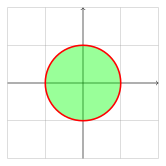
Note
We represent the circle by many quadratic segments. NURBS are not implemented in this code to represent exactly circles. You can choose the number of quadratic terms by changing
ndivangle.
- empty = EmptyShape
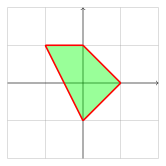
- static polygon(vertices: Tuple[Point2D]) SimpleShape[source]
Creates a generic polygon
- vertices: tuple[Point2D]
Vertices of the polygon
- returnSimpleShape
The simple shape that represents the polygon
Example use
>>> from shapepy import Primitive
>>> vertices = [(1, 0), (0, 1), (-1, 1), (0, -1)]
>>> shape = Primitive.polygon(vertices)
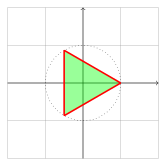
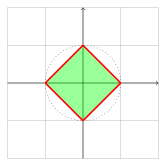
- static regular_polygon(nsides: int, radius: float = 1, center: Point2D = (0, 0)) SimpleShape[source]
Creates a regular polygon
Parameters
- nsidesint
Number of sides of regular polygon, >= 3
- radiusfloat, default: 1
Radius of the external circle that contains the polygon.
- centerPoint2D, default: (0, 0)
The geometric center of the regular polygon
- returnSimpleShape
The simple shape that represents the regular polygon
Example use
>>> from shapepy import Primitive
>>> triangle = Primitive.regular_polygon(nsides = 3)
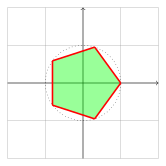
- static square(side: float = 1, center: Point2D = (0, 0)) SimpleShape[source]
Creates a square with sides aligned with axis
Parameters
- sidefloat, default: 1
Side of the square.
- centerPoint2D, default: (0, 0)
The geometric center of the square
- returnSimpleShape
The simple shape that represents the square
Example use
>>> from shapepy import Primitive
>>> square = Primitive.square()
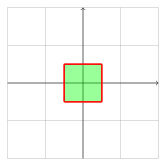
- static triangle(side: float = 1, center: Point2D = (0, 0)) SimpleShape[source]
Create a right triangle
Parameters
- sidefloat, default: 1
Width and height of the triangle
- centerPoint2D, default: (0, 0)
Position of the vertex of right angle
- returnSimpleShape
The simple shape that represents the triangle
Example use
>>> from shapepy import Primitive
>>> triangle = Primitive.triangle()
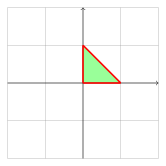
- whole = WholeShape
- class shapepy.bool2d.shape.EmptyShape[source]
EmptyShape is a singleton class to represent an empty shape
Example use
>>> from shapepy import EmptyShape
>>> empty = EmptyShape()
>>> print(empty)
EmptyShape
>>> print(float(empty))  # Area
0.0
>>> (0, 0) in empty
False
- move(_)[source]
Moves/translate entire shape by an amount
Parameters
- pointPoint2D
The amount to move
- return:
The same instance
- rtype:
SubSetR2
Example use
>>> from shapepy import Primitive
>>> circle = Primitive.circle()
>>> circle.move(1, 2)
- class shapepy.bool2d.shape.SimpleShape(jordancurve: JordanCurve)[source]
Bases:
DefinedShapeSimpleShape class
Is a shape which is defined by only one jordan curve. It represents the interior/exterior region of the jordan curve if the jordan curve is counter-clockwise/clockwise
- property area: Real
The internal area that is enclosed by the shape
- box() Box
Box that encloses all jordan curves
Parameters
- return:
The box that encloses all
- rtype:
Box
Example use
>>> from shapepy import Primitive, IntegrateShape >>> circle = Primitive.circle(radius = 1) >>> circle.box() Box with vertices (-1.0, -1.0) and (1., 1.0)
- contains_jordan(jordan: JordanCurve, boundary: bool | None = True) bool
Checks if the all points of jordan are inside the shape
Parameters
- jordanJordanCurve
The jordan curve to verify
- boundarybool, default = True
The flag to check if jordan is inside a closed (True) or open (False) set
- return:
Whether the jordan is inside or not
- rtype:
bool
Example use
>>> from shapepy import Primitive >>> square = Primitive.square() >>> jordan = small_square.jordans[0] >>> square.contains_jordan(jordan) True
- contains_point(point: Point2D, boundary: bool | None = True) bool
Checks if given point is inside the shape
Parameters
- pointPoint2D
The point to verify if is inside
- boundarybool, default = True
The flag to decide if a boundary point is considered inside or outside. If
True, then a boundary point is considered inside.
- return:
Whether the point is inside or not
- rtype:
bool
Example use
>>> from shapepy import Primitive >>> square = Primitive.square() >>> square.contains_point((0, 0)) True >>> square.contains_point((0.5, 0), True) True >>> square.contains_point((0.5, 0), False) False
- contains_shape(other: SubSetR2) bool
Checks if the all points of given shape are inside the shape
Mathematically speaking, checks if
otheris a subset ofselfParameters
- otherSubSetR2
The shape to be verified if is inside
- return:
Whether the
othershape is inside or not- rtype:
bool
Example use
>>> from shapepy import Primitive >>> square = Primitive.regular_polygon(4) >>> circle = Primitive.circle() >>> circle.contains_shape(square) True
- invert() SimpleShape[source]
Inverts the region of simple shape.
Parameters
- return:
The same instance
- rtype:
SimpleShape
Example use
>>> from shapepy import Primitive >>> square = Primitive.square() >>> print(square) Simple Shape of area 1.00 with vertices: [[ 0.5 0.5] [-0.5 0.5] [-0.5 -0.5] [ 0.5 -0.5]] >>> square.invert() Simple Shape of area -1.00 with vertices: [[ 0.5 0.5] [ 0.5 -0.5] [-0.5 -0.5] [-0.5 0.5]]
- property jordans: Tuple[JordanCurve]
The jordans curve that define the SimpleShape
It has only one jordan curve inside it
- move(vector: Point2D) JordanCurve[source]
Moves/translate entire shape by an amount
Parameters
- pointPoint2D
The amount to move
- return:
The same instance
- rtype:
SubSetR2
Example use
>>> from shapepy import Primitive >>> circle = Primitive.circle() >>> circle.move(1, 2)
- rotate(angle: Angle) JordanCurve[source]
Rotates entire shape around the origin by an amount
Parameters
- angleAngle
The amount to rotate around origin
- return:
The same instance
- rtype:
SubSetR2
Example use
>>> from shapepy import Primitive
>>> circle = Primitive.circle()
>>> circle.rotate(Angle.degrees(90))
- scale(amount: Real | Tuple[Real, Real]) JordanCurve[source]
Scales entire subset by an amount
Parameters
- amountReal | Tuple[Real, Real]
The amount to scale in horizontal and vertical direction
- return:
The same instance
- rtype:
SubSetR2
Example use
>>> from shapepy import Primitive
>>> circle = Primitive.circle()
>>> circle.scale((2, 3))
- class shapepy.bool2d.shape.ConnectedShape(subshapes: Tuple[SimpleShape])[source]
Bases:
DefinedShapeConnectedShape Class
A shape defined by intersection of two or more SimpleShapes
- property area: Real
The internal area that is enclosed by the shape
- box() Box
Box that encloses all jordan curves
Parameters
- return:
The box that encloses all
- rtype:
Box
Example use
>>> from shapepy import Primitive, IntegrateShape
>>> circle = Primitive.circle(radius = 1)
>>> circle.box()
Box with vertices (-1.0, -1.0) and (1., 1.0)
- contains_jordan(jordan: JordanCurve, boundary: bool | None = True) bool
Checks if the all points of jordan are inside the shape
Parameters
- jordanJordanCurve
The jordan curve to verify
- boundarybool, default = True
The flag to check if jordan is inside a closed (True) or open (False) set
- return:
Whether the jordan is inside or not
- rtype:
bool
Example use
>>> from shapepy import Primitive
>>> square = Primitive.square()
>>> jordan = small_square.jordans[0]
>>> square.contains_jordan(jordan)
True
- contains_point(point: Point2D, boundary: bool | None = True) bool
Checks if given point is inside the shape
Parameters
- pointPoint2D
The point to verify if is inside
- boundarybool, default = True
The flag to decide if a boundary point is considered inside or outside. If
True, then a boundary point is considered inside.
- return:
Whether the point is inside or not
- rtype:
bool
Example use
>>> from shapepy import Primitive
>>> square = Primitive.square()
>>> square.contains_point((0, 0))
True
>>> square.contains_point((0.5, 0), True)
True
>>> square.contains_point((0.5, 0), False)
False
- contains_shape(other: SubSetR2) bool
Checks if the all points of given shape are inside the shape
Mathematically speaking, checks if
otheris a subset ofselfParameters
- otherSubSetR2
The shape to be verified if is inside
- return:
Whether the
othershape is inside or not- rtype:
bool
Example use
>>> from shapepy import Primitive
>>> square = Primitive.regular_polygon(4)
>>> circle = Primitive.circle()
>>> circle.contains_shape(square)
True
- property jordans: Tuple[JordanCurve]
Jordan curves that defines the shape
- Getter:
Returns a set of jordan curves
- Type:
tuple[JordanCurve]
- move(vector: Point2D) JordanCurve[source]
Moves/translate entire shape by an amount
Parameters
- pointPoint2D
The amount to move
- return:
The same instance
- rtype:
SubSetR2
Example use
>>> from shapepy import Primitive
>>> circle = Primitive.circle()
>>> circle.move(1, 2)
- rotate(angle: Angle) JordanCurve[source]
Rotates entire shape around the origin by an amount
Parameters
- angleAngle
The amount to rotate around origin
- return:
The same instance
- rtype:
SubSetR2
Example use
>>> from shapepy import Primitive
>>> circle = Primitive.circle()
>>> circle.rotate(Angle.degrees(90))
- scale(amount: Real | Tuple[Real, Real]) JordanCurve[source]
Scales entire subset by an amount
Parameters
- amountReal | Tuple[Real, Real]
The amount to scale in horizontal and vertical direction
- return:
The same instance
- rtype:
SubSetR2
Example use
>>> from shapepy import Primitive
>>> circle = Primitive.circle()
>>> circle.scale((2, 3))
- property subshapes: Tuple[SimpleShape]
Subshapes that defines the connected shape
- Getter:
Subshapes that defines connected shape
- Setter:
Subshapes that defines connected shape
- Type:
tuple[SimpleShape]
Example use
>>> from shapepy import Primitive >>> big_square = Primitive.square(side = 2) >>> small_square = Primitive.square(side = 1) >>> shape = big_square - small_square >>> for subshape in shape.subshapes: print(subshape) Simple Shape of area 4.00 with vertices: [[ 1. 1.] [-1. 1.] [-1. -1.] [ 1. -1.]] Simple Shape of area -1.00 with vertices: [[ 0.5 0.5] [ 0.5 -0.5] [-0.5 -0.5] [-0.5 0.5]]
- class shapepy.bool2d.shape.DisjointShape(subshapes: Tuple[ConnectedShape])[source]
Bases:
DefinedShapeDisjointShape Class
A shape defined by the union of some SimpleShape instances and ConnectedShape instances
- property area: Real
The internal area that is enclosed by the shape
- box() Box
Box that encloses all jordan curves
Parameters
- return:
The box that encloses all
- rtype:
Box
Example use
>>> from shapepy import Primitive, IntegrateShape
>>> circle = Primitive.circle(radius = 1)
>>> circle.box()
Box with vertices (-1.0, -1.0) and (1., 1.0)
- contains_jordan(jordan: JordanCurve, boundary: bool | None = True) bool
Checks if the all points of jordan are inside the shape
Parameters
- jordanJordanCurve
The jordan curve to verify
- boundarybool, default = True
The flag to check if jordan is inside a closed (True) or open (False) set
- return:
Whether the jordan is inside or not
- rtype:
bool
Example use
>>> from shapepy import Primitive
>>> square = Primitive.square()
>>> jordan = small_square.jordans[0]
>>> square.contains_jordan(jordan)
True
- contains_point(point: Point2D, boundary: bool | None = True) bool
Checks if given point is inside the shape
Parameters
- pointPoint2D
The point to verify if is inside
- boundarybool, default = True
The flag to decide if a boundary point is considered inside or outside. If
True, then a boundary point is considered inside.
- return:
Whether the point is inside or not
- rtype:
bool
Example use
>>> from shapepy import Primitive
>>> square = Primitive.square()
>>> square.contains_point((0, 0))
True
>>> square.contains_point((0.5, 0), True)
True
>>> square.contains_point((0.5, 0), False)
False
- contains_shape(other: SubSetR2) bool
Checks if the all points of given shape are inside the shape
Mathematically speaking, checks if
otheris a subset ofselfParameters
- otherSubSetR2
The shape to be verified if is inside
- return:
Whether the
othershape is inside or not- rtype:
bool
Example use
>>> from shapepy import Primitive
>>> square = Primitive.regular_polygon(4)
>>> circle = Primitive.circle()
>>> circle.contains_shape(square)
True
- property jordans: Tuple[JordanCurve]
Jordan curves that defines the shape
- Getter:
Returns a set of jordan curves
- Type:
tuple[JordanCurve]
- move(vector: Point2D) JordanCurve[source]
Moves/translate entire shape by an amount
Parameters
- pointPoint2D
The amount to move
- return:
The same instance
- rtype:
SubSetR2
Example use
>>> from shapepy import Primitive
>>> circle = Primitive.circle()
>>> circle.move(1, 2)
- rotate(angle: Angle) JordanCurve[source]
Rotates entire shape around the origin by an amount
Parameters
- angleAngle
The amount to rotate around origin
- return:
The same instance
- rtype:
SubSetR2
Example use
>>> from shapepy import Primitive
>>> circle = Primitive.circle()
>>> circle.rotate(Angle.degrees(90))
- scale(amount: Real | Tuple[Real, Real]) JordanCurve[source]
Scales entire subset by an amount
Parameters
- amountReal | Tuple[Real, Real]
The amount to scale in horizontal and vertical direction
- return:
The same instance
- rtype:
SubSetR2
Example use
>>> from shapepy import Primitive
>>> circle = Primitive.circle()
>>> circle.scale((2, 3))
- property subshapes: Tuple[SimpleShape | ConnectedShape]
Subshapes that defines the disjoint shape
- Getter:
Subshapes that defines disjoint shape
- Setter:
Subshapes that defines disjoint shape
- Type:
tuple[SimpleShape | ConnectedShape]
Example use
>>> from shapepy import Primitive
>>> left = Primitive.square(center=(-2, 0))
>>> right = Primitive.square(center = (2, 0))
>>> shape = left | right
>>> for subshape in shape.subshapes:
        print(subshape)
Simple Shape of area 1.00 with vertices:
[[-1.5  0.5]
[-2.5  0.5]
[-2.5 -0.5]
[-1.5 -0.5]]
Simple Shape of area 1.00 with vertices:
[[ 2.5  0.5]
[ 1.5  0.5]
[ 1.5 -0.5]
[ 2.5 -0.5]]