Get started
This library allows you to operate between Shapes, for example, the two shapes bellow can be united or can be intersected:
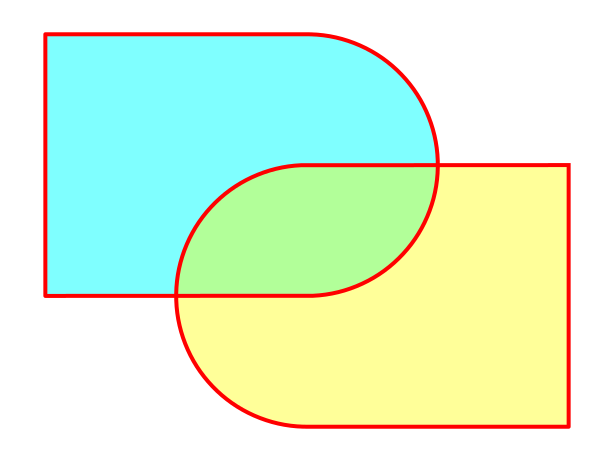
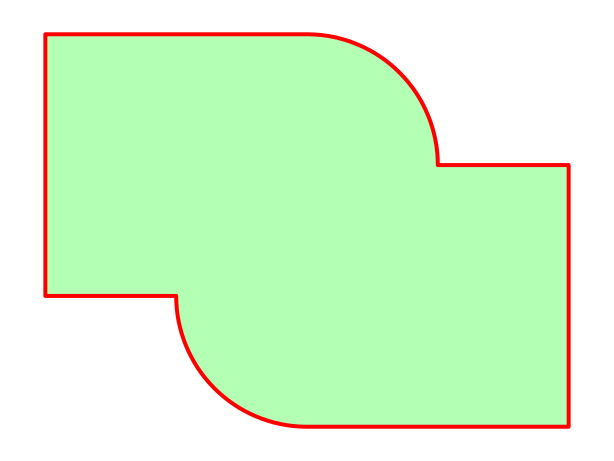
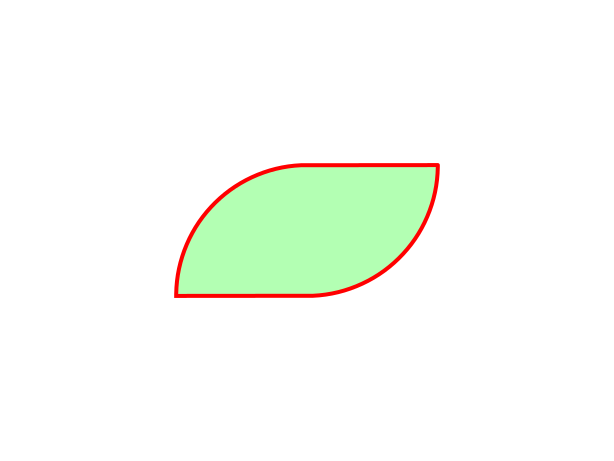
The initial step is creating shapes. There’s the class Primitive which have functions such square and circle that will help us to generate basic shapes. First we create the left shape by uniting a circle and a square
from shapepy import Primitive

# Create the left shape
circle = Primitive.circle(radius = 1, center = (0, 0))
square = Primitive.square(side = 2, center = (-1, 0))
left_shape = square + circle  # Unite shapes
Then we create the right shape by moving and rotating the left shape
from copy import deepcopy

# Create the right shape
right_shape = deepcopy(left_shape)
right_shape.rotate(180, degrees = True)
right_shape.move(0, -1)
We plot both shapes by using matplotlib
from shapepy import PlotShape

# Create ploter
plt = PlotShape()

# Plot the left shape
plt.plot(left_shape, fill_color = "cyan")
# Plot the right shape
plt.plot(right_shape, fill_color = "yellow")

# Show images on screen
plt.show()
Now we unite and intersect the left_shape and right_shape:
# Unite left and right. You can also use +
union_shape = left_shape | right_shape

# Intersect left and right. You can also use *
intersection_shape = left_shape & right_shape
We finally plot the figure
# Plot the union shape
plt = PlotShape()
plt.plot(union_shape)

# Plot the intersection shape
plt = PlotShape()
plt.plot(intersection_shape)

# Show images on screen
plt.show()
It’s also possible to get properties of the shape, such as area, momentum of area and inertia of area:
from shapepy import IntegrateShape

area = IntegrateShape.area(union)  # 9.571110535844964

moment_x = IntegrateShape.polynomial(union, 1, 0)  # -7.502679e-16
moment_y = IntegrateShape.polynomial(union, 0, 1)  # -4.785555267922482

inertia_xx = IntegrateShape.polynomial(union, 2, 0)  # 11.059522875398848
inertia_xy = IntegrateShape.polynomial(union, 1, 1)  # -3.416464745608603
inertia_yy = IntegrateShape.polynomial(union, 0, 2)  # 8.511945596141624
Once you got the main idea, you can create your own shape. We recomend now see the next topic Primitive
Code to generate the logo
from matplotlib import pyplot
from shapepy import Primitive, ShapePloter

S = Primitive.circle(ndivangle=4).scale(1, 1.5)
S -= Primitive.square(center = (0.3, 1.25)).scale(2, 0.5)
S -= Primitive.square(center = (-0.3, -1.25)).scale(2, 0.5)

H = Primitive.square().scale(2, 3)
H -= Primitive.square().scale(0.5, 3).move(0, 2)
H -= Primitive.square().scale(0.5, 3).move(0, -2)
H.move(3, 0)

A = Primitive.regular_polygon(3).rotate(90, True).scale(1, 2)
A -= Primitive.regular_polygon(3).rotate(90, True).scale(0.3, 2*0.3)
A.move(6-0.14, -0.5)

P = Primitive.square().scale(1, 3)
P += Primitive.circle(ndivangle=4).scale(1.5, 0.75).move(0.5, 0.75)
P -= Primitive.square().scale(1, 3).move(7.8-8.5, 0)
P -= Primitive.circle(ndivangle=4).scale(0.5, 0.25).move(1, 0.75)
P -= Primitive.square().scale(0.5, 0.5).move(9.25-8.5, 0.75)
P.move(8.5-0.6, 0)

E = Primitive.square().scale(2, 3)
E -= Primitive.square(center = (0.3, 1.25)).scale(2, 0.5)
E -= Primitive.square(center = (0.3, -1.25)).scale(2, 0.5)
E.move(13-1.1, 0)

SHAPE = S + H + A + P + E

fig = pyplot.figure(figsize=(15, 5))
plt = ShapePloter(fig = fig)
plt.plot(SHAPE)
ax = plt.gca()
ax.set_aspect("equal")
ax.spines['top'].set_visible(False)
ax.spines['right'].set_visible(False)
ax.spines['bottom'].set_visible(False)
ax.spines['left'].set_visible(False)
ax.get_xaxis().set_ticks([])
ax.get_yaxis().set_ticks([])
fig.tight_layout()
plt.savefig("logo.svg")
# plt.show()