Shapes
Introduction
A shape represents a region on the plane and are divided in 5 types:
EmptyShape, mathematically it’s the empty set with no interior pointsWholeShape, mathematically it’s the set with all the points in planeSimpleShape, is represented by only one jordan curve,ConnectedShape, is the intersection someSimpleShapeDisjointShape, is the union of someConnectedShape
For any pair of shapes, you can use operators:
|- Union (OR)&- Intersection (AND)-- Subtraction^- XOR~- Inversionin- Contains
Empty and Whole
They are singleton objects which are used to be returned in boolean operations.
For example, there are some sta
from shapepy import EmptyShape, WholeShape

empty = EmptyShape()
whole = WholeShape()

empty | whole is whole  # OR
empty & whole is empty  # AND
empty ^ whole is whole  # XOR
empty - whole is empty  # SUB
whole - empty is whole  # SUB
~empty is whole  # Invert
~whole is empty  # Invert
empty in whole  # Contains
whole not in empty  # Contains
They are returned when, for any shape:
shape | (~shape)  # Whole
shape & (~shape)  # Empty
shape - shape  # Empty
shape ^ shape  # Empty
shape ^ (~shape)  # Whole
Simple Shape
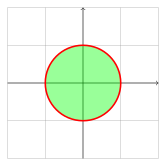
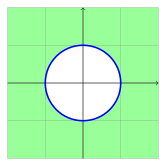
This shape is described by only one JordanCurve.
- If the jordan curve is counter-clockwise (positive),
The simple shape will be the interior of the curve
- If the jordan curve is clockwise (negative),
The simple shape will be the exterior of the curve
As example, bellow we have a positive (left image) and a negative circle (right image).
The easiest way to create it is by using Primitive,
which allows creating many simple shapes, like square and circle
from shapepy import Primitive
my_square = Primitive.square()
my_circle = Primitive.circle()
You can also create your custom SimpleShape by using a passing a JordanCurve
from shapepy import JordanCurve, SimpleShape
vertices = [(0, 0), (4, 0), (0, 3)]
jordan = FactoryJordan.polygon(vertices)
simple = SimpleShape(jordan)
It’s possible to operate between two simple shapes:
from shapepy import Primitive
my_square = Primitive.square()
my_circle = Primitive.circle()

~my_square  # INVERT
my_square | my_circle  # OR
my_square & my_circle  # AND
my_square - my_circle  # SUB
my_square ^ my_circle  # XOR
(0, 0) in my_square  # Contains
my_square in my_circle  # Contains
You find bellow a table with the basic operations between two positive circles (simple shapes).

Connected Shape
This shape is described by the intersection of simple shapes:
Two examples of connected shapes are bellow.
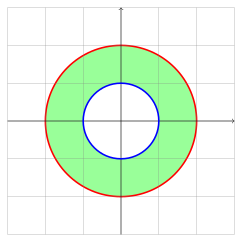
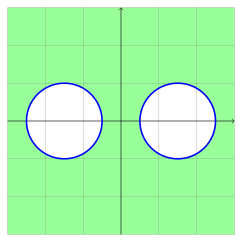
The easiest way to create them is by operating between shapes. For example:
from shapepy import Primitive

big_circle = Primitive.circle(radius = 2)
small_circle = Primitive.circle(radius = 1)
hollow_circle = big_circle - small_circle
It’s also possible to create directly the ConnectedShape instance, but it may raise ValueError if the input is wrong:
from shapepy import Primitive, ConnectedShape

big_circle = Primitive.circle(radius = 2)
small_circle = Primitive.circle(radius = 1)
hollow_circle = ConnectedShape([big_circle, ~small_circle])
Disjoint Shape
This shape is described by the union of simple and connected shapes:
Some examples of disjoint shapes are


The easiest way to create them is by operating shapes. For example, the code bellow creates the respective figure.
from shapepy import Primitive, ConnectedShape

left = Primitive.circle(radius = 1, center = (-1.5, 0))
right = Primitive.circle(radius = 1, center = (1.5, 0))
disjoint = left | right

You can also create directly
from shapepy import Primitive, DisjointShape

left = Primitive.circle(radius = 2)
right = Primitive.circle(radius = 1)
hollow_circle = ConnectedShape([big_circle, ~small_circle])
Boolean Operations
The boolean operations can be tricky, bellow you find tables for operations between two shapes. We represent the shapes categories as \(E\) (empty), \(W\) (whole), \(S\) (simple), \(C\) (connected) and \(D\) (disjoint)
\(E\) |
\(W\) |
\(S\) |
\(C\) |
\(D\) |
|---|---|---|---|---|
\(W\) |
\(E\) |
\(S\) |
\(D\) |
\(C\), \(D\) |
\(E\) |
\(W\) |
\(S\) |
\(C\) |
\(D\) |
|
|---|---|---|---|---|---|
\(E\) |
\(E\) |
\(W\) |
\(S\) |
\(C\) |
\(D\) |
\(W\) |
\(W\) |
\(W\) |
\(W\) |
\(W\) |
\(W\) |
\(S\) |
\(S\) |
\(W\) |
\(W\), \(S\), \(C\), \(D\) |
\(W\), \(S\), \(C\), \(D\) |
\(W\), \(S\), \(C\), \(D\) |
\(C\) |
\(C\) |
\(W\) |
\(W\), \(S\), \(C\), \(D\) |
\(W\), \(S\), \(C\), \(D\) |
\(W\), \(S\), \(C\), \(D\) |
\(D\) |
\(D\) |
\(W\) |
\(W\), \(S\), \(C\), \(D\) |
\(W\), \(S\), \(C\), \(D\) |
\(W\), \(S\), \(C\), \(D\) |
\(E\) |
\(W\) |
\(S\) |
\(C\) |
\(D\) |
|
|---|---|---|---|---|---|
\(E\) |
\(E\) |
\(E\) |
\(E\) |
\(E\) |
\(E\) |
\(W\) |
\(E\) |
\(W\) |
\(S\) |
\(C\) |
\(D\) |
\(S\) |
\(E\) |
\(S\) |
\(E\), \(S\), \(C\), \(D\) |
\(E\), \(S\), \(C\), \(D\) |
\(E\), \(S\), \(C\), \(D\) |
\(C\) |
\(E\) |
\(C\) |
\(E\), \(S\), \(C\), \(D\) |
\(E\), \(S\), \(C\), \(D\) |
\(E\), \(S\), \(C\), \(D\) |
\(D\) |
\(E\) |
\(D\) |
\(E\), \(S\), \(C\), \(D\) |
\(E\), \(S\), \(C\), \(D\) |
\(E\), \(S\), \(C\), \(D\) |
\(E\) |
\(W\) |
\(S\) |
\(C\) |
\(D\) |
|
|---|---|---|---|---|---|
\(E\) |
\(E\) |
\(E\) |
\(E\) |
\(E\) |
\(E\) |
\(W\) |
\(W\) |
\(E\) |
\(S\) |
\(D\) |
\(C, D\) |
\(S\) |
\(S\) |
\(E\) |
\(E\), \(S\), \(C\), \(D\) |
\(E\), \(S\), \(C\), \(D\) |
\(E\), \(S\), \(C\), \(D\) |
\(C\) |
\(C\) |
\(E\) |
\(E\), \(S\), \(C\), \(D\) |
\(E\), \(S\), \(C\), \(D\) |
\(E\), \(S\), \(C\), \(D\) |
\(D\) |
\(D\) |
\(E\) |
\(E\), \(S\), \(C\), \(D\) |
\(E\), \(S\), \(C\), \(D\) |
\(E\), \(S\), \(C\), \(D\) |
\(E\) |
\(W\) |
\(S\) |
\(C\) |
\(D\) |
|
|---|---|---|---|---|---|
\(E\) |
\(E\) |
\(W\) |
\(S\) |
\(C\) |
\(D\) |
\(W\) |
\(W\) |
\(E\) |
\(S\) |
\(D\) |
\(C\), \(D\) |
\(S\) |
\(S\) |
\(S\) |
any |
any |
any |
\(C\) |
\(C\) |
\(D\) |
any |
any |
any |
\(D\) |
\(D\) |
\(C\), \(D\) |
any |
any |
any |