Jordan Curve
Introduction
Jordan Curve is a continuous closed curve which doesn’t intersect itself.
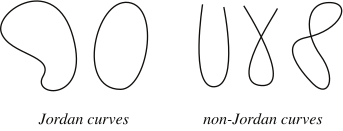
For our purpose, we use oriented jordan curve by setting a positive direction as counter-clockwise.
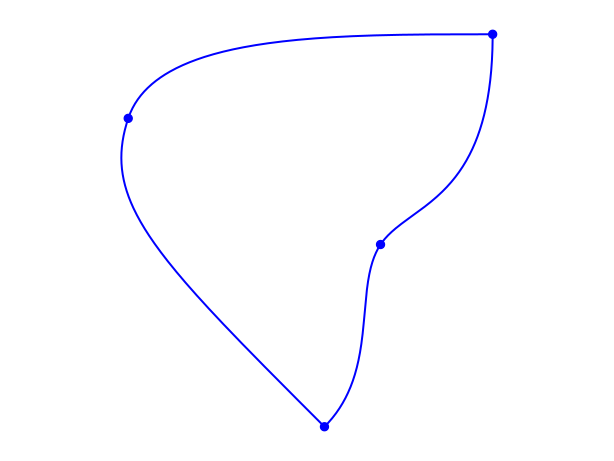
Although a jordan curve can be very general, we restrict and use only jordan curves which are piecewise smooth curves. We call each piece as a segment, a planar bezier curve.
Creating a segment
A segment is a PlanarBezier instance. You create a new instance by passing the ctrlpoints of the curve. For example, we have a linear and a quadratic segment in the figure bellow
from shapepy import PlanarBezier
# Creates a liner segment between (1, 2) and (4, 0)
linear_segment = PlanarBezier([(1, 2),
                               (4, 0)])
# Creates a quadratic segment
quadratic_segment = PlanarBezier([(1, 2),
                                  (4, 2),
                                  (4, 0)])

Creating a jordan curve
There are 4 ways to create a JordanCurve instance:
From segments:
JordanCurvedirectlyFrom vertices:
FactoryJordan.polygonFrom spline curve:
FactoryJordan.spline_curve
From vertices
This method creates polygonal shapes only
from shapepy import JordanCurve

# Create a list of vertices
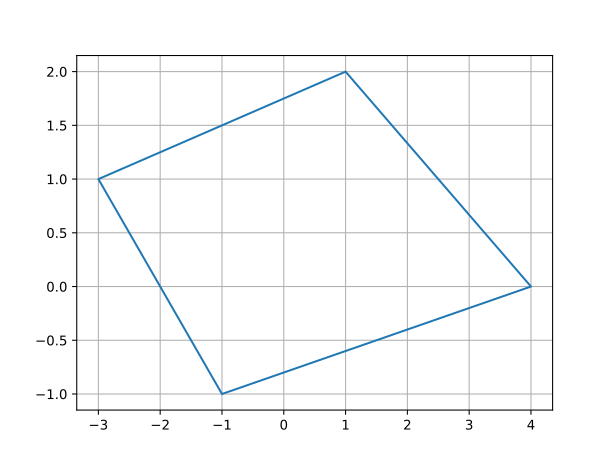
vertices = [(1, 2), (4, 0), (-1, -1), (-3, 1)]
# Creates a quadrilateral jordan
jordan = FactoryJordan.polygon(vertices)
From segments
This method can create shape of any degree
from shapepy import Segment, JordanCurve
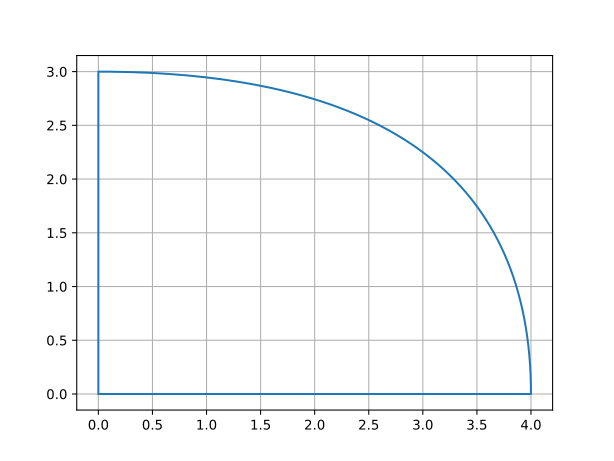
segment0 = Segment([(0, 0), (4, 0)])
segment1 = Segment([(4, 0), (4, 3), (0, 3)])
segment2 = Segment([(0, 3), (0, 0)])
segments = [segment0, segment1, segment2]
jordan = JordanCurve(segments)
From spline
For this case, we will use the package pynurbs
import pynurbs
from shapepy import Point2D, JordanCurve
knotvector = (0, 0, 0, 1/3, 1/3, 2/3, 2/3, 1, 1, 1)
ctrlpoints = [(0, 0), (2, 0), (4, 0), (4, 3),
              (0, 3), (0, 3/2), (0, 0)]
ctrlpoints = [cartesian(point) for point in ctrlpoints]
curve = pynurbs.Curve(knotvector, ctrlpoints)
jordan = FactoryJordan.spline_curve(curve)